Best Gaming Router Under $200 in the USA 2026
Looking for the best gaming router under $200 in the USA? The GL.iNet Flint 3e offers Wi-Fi 7 speeds up to 6.5 Gbps, low-latency gaming, fast VPN support, and coverage up to 2,500 sq. ft. It is a powerful option for gaming, 4K streaming, video calls, and busy smart homes.
Best Gaming Router Under $200 USA: GL.iNet Flint 3e Wi-Fi 7 Review
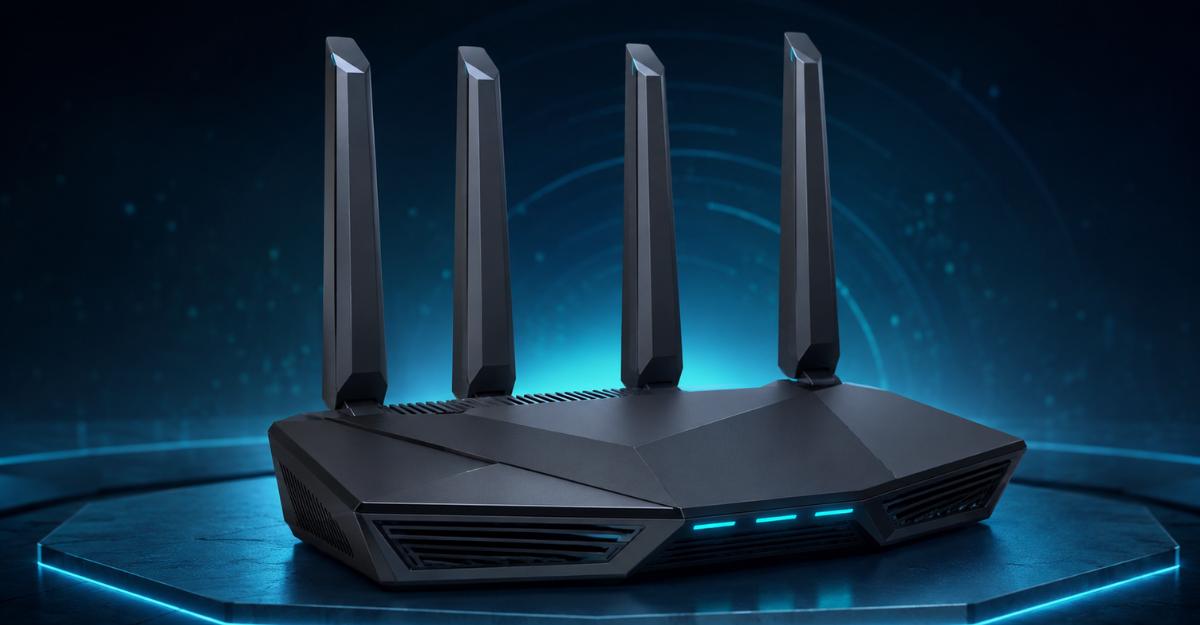
Finding a fast and reliable gaming router without spending a fortune can be difficult. Many premium routers cost several hundred dollars, while cheaper models may struggle with latency, coverage, or multiple connected devices. The GL.iNet GL-BE6500 Flint 3e aims to offer a practical middle ground with Wi-Fi 7 technology, strong VPN performance, extensive coverage, and advanced network controls.
If you are searching for the best gaming router under $200 in the USA, the Flint 3e deserves consideration. It supports wireless speeds of up to 6.5 Gbps, Multi-Link Operation, 4K-QAM, more than 100 connected devices, and built-in support for popular VPN protocols.
This review examines its gaming performance, Wi-Fi coverage, security features, VPN capabilities, advantages, limitations, and overall value to help you decide whether it is suitable for your home.
Price note: Router prices frequently change. Check the current retailer price before purchasing to confirm that it remains within your $200 budget.
GL.iNet Flint 3e Specifications
| Feature | Details |
|---|---|
| Brand | GL.iNet |
| Model | Flint 3e GL-BE6500 |
| Wi-Fi Standard | Wi-Fi 7, 802.11be |
| Maximum Wireless Speed | Up to 6.5 Gbps |
| Frequency Class | Dual-band |
| VPN Support | WireGuard and OpenVPN |
| Maximum VPN Speed | Up to 680 Mbps |
| Coverage | Up to 2,500 square feet |
| Device Capacity | More than 100 devices |
| Memory | 1GB DDR4 |
| Special Features | MLO, 4K-QAM, remote access, AdGuard Home |
| Recommended Uses | Gaming, home, business, streaming |
| Connectivity | Wi-Fi and Ethernet |
| Parental Controls | Bark integration |
| Color | Black |
Why the Flint 3e Is a Strong Gaming Router Under $200
A good gaming router should do more than advertise a high maximum speed. It must provide stable connections, low latency, suitable coverage, and enough processing capacity to manage multiple devices without interrupting gameplay.
The Flint 3e combines Wi-Fi 7 features with flexible network management. Its maximum advertised wireless speed of 6.5 Gbps provides plenty of capacity for gaming, streaming, downloads, and video calls. However, your real-world speed will depend on your internet plan, device compatibility, distance from the router, interference, and home layout.
For gamers, the most valuable benefits are its low-latency Wi-Fi 7 connection, MLO support, wired Ethernet connectivity, and ability to manage many connected devices.
If you want to compare more router options before buying, explore our guide to the best gaming routers for 2026, including models for competitive gaming, streaming, and busy smart homes.
Wi-Fi 7 Performance for Low-Latency Gaming
Wi-Fi 7 is one of the main reasons to consider the GL.iNet Flint 3e over an older Wi-Fi 5 or Wi-Fi 6 router. The latest wireless standard introduces technologies designed to improve speed, efficiency, and performance in busy network environments.
Multi-Link Operation
Multi-Link Operation, commonly known as MLO, allows a compatible Wi-Fi 7 device to use multiple wireless links more efficiently. This can improve connection reliability and reduce delays when network conditions change.
For gaming, a stable connection is often more important than an extremely high headline speed. MLO can help reduce interruptions when other people in the home are streaming videos, joining online meetings, or downloading large files.
You will need an MLO-compatible Wi-Fi 7 computer, smartphone, or gaming device to receive its full benefits. Older devices can still connect to the router, but they will use the wireless standard supported by their hardware.
A quality router is only one part of a complete gaming setup. You can also check our RGB wireless gaming keyboard and mouse review for a responsive and organized gaming experience.
4K-QAM Technology
The Flint 3e also supports 4K-QAM, which allows compatible devices to transmit more data within the available wireless signal. Under favorable conditions, this can produce faster transfers and make better use of the router’s bandwidth.
The largest improvement is typically available when you are close to the router with a strong signal. Walls, interference, and device limitations can reduce real-world results.
👉 “Click here for detailed guide”
Improved Performance in Busy Homes
Technologies such as enhanced OFDMA, Multi-RUs, and preamble puncturing help the router use available wireless resources more efficiently. These features can be useful when dozens of phones, computers, smart televisions, cameras, and smart-home devices are connected simultaneously.
Instead of allowing one busy device to disrupt the entire network, the router can distribute network resources more effectively. That makes it suitable for family homes where gaming is only one of several high-bandwidth activities.
Can It Handle Competitive Online Gaming?
The Flint 3e has the technical foundation required for smooth online gaming. Wi-Fi 7, low-latency features, and its high wireless capacity can help maintain a responsive connection during multiplayer sessions.
However, no router can completely eliminate gaming lag. Latency can also be affected by:
- The quality of your internet service
- Distance from the game server
- Network congestion
- Weak wireless signals
- Background downloads
- VPN server location
- Game-server performance
For competitive gaming, connecting your PC or console directly to the router with an Ethernet cable is still the most dependable option. A wired connection removes many sources of wireless interference and usually provides more consistent latency.
Wi-Fi 7 is an excellent alternative when running an Ethernet cable is impractical, especially if your gaming device supports the new standard.
Clear positional audio and reliable communication can also improve online gameplay. Read our HyperX Cloud II gaming headset review to learn about its sound quality, microphone, comfort, and overall value.
Fast OpenVPN and WireGuard Support
One of the Flint 3e’s most distinctive features is its built-in VPN capability. The router supports both WireGuard and OpenVPN, with advertised VPN performance reaching up to 680 Mbps under suitable conditions.
Router-level VPN support allows you to protect compatible devices without installing separate VPN software on each one. It can be useful for computers, smartphones, streaming devices, and other hardware that does not offer convenient VPN configuration.
WireGuard is generally the better choice for gaming because it is designed to provide efficient performance with relatively low overhead. OpenVPN offers broad compatibility but may produce slower speeds depending on the configuration.
Actual VPN performance varies according to:
- Your VPN provider
- The selected protocol
- VPN server distance and workload
- Internet connection speed
- Encryption settings
- Current network conditions
A VPN does not automatically reduce gaming latency. Connecting to a distant VPN server can increase ping. Choose a nearby, high-quality server if you plan to play games through a VPN.
Coverage for Medium and Larger Homes
GL.iNet advertises coverage of up to approximately 2,500 square feet for the Flint 3e. This can be sufficient for many apartments, medium-sized houses, offices, and gaming setups.
Coverage will vary according to the router’s location and the construction of your home. Concrete walls, metal surfaces, multiple floors, appliances, and nearby networks can weaken the signal.
For better coverage, position the router:
- Near the center of your home
- On an elevated and open surface
- Away from thick walls and large metal objects
- Away from microwave ovens and similar interference sources
- As close as practical to gaming devices
A very large or multi-story home may still require an additional access point or mesh solution for complete coverage.
Support for More Than 100 Devices
Modern homes often have far more connected equipment than expected. Computers, tablets, phones, smart speakers, security cameras, televisions, game consoles, and appliances can quickly create a crowded network.
The Flint 3e is designed to support more than 100 devices. Its 1GB of DDR4 memory also provides space for network features and additional plugins.
This capacity does not mean every connected device can download at full speed simultaneously. Your internet plan remains the main limit on external bandwidth. However, the router is designed to coordinate a large number of connections while maintaining a stable local network.
Gamers interested in a powerful Wi-Fi 6 router with VPN support can read our detailed “GL.iNet Flint 2 review.”
AdGuard Home Support
Flint 3e supports AdGuard Home, a DNS-based filtering platform that can block many advertising, tracking, and unwanted domains across your network.
Because filtering occurs at the network level, it may protect devices that do not support regular browser extensions. Users can access a web interface to review and customize filtering rules.
AdGuard Home cannot block every advertisement, particularly content served from the same domain as the platform itself. Incorrect filtering rules may also interfere with certain websites or applications. Begin with standard filters and customize them gradually.
Parental Controls with Bark
Families may appreciate the router’s integrated support for Bark parental-control tools. Depending on the service configuration, parents can filter websites, enforce safe-search settings, and create screen-time limits.
These controls can help families manage internet access without manually configuring every device. Some advanced Bark features or services may require a separate account or subscription, so check the latest terms before relying on a specific function.
Easy Setup and Network Management
The Flint 3e can be connected to a computer through Ethernet for initial setup. Users can then access its web administration panel to configure internet access, Wi-Fi settings, security features, VPN connections, and additional options.
Basic setup should be manageable for regular home users, while advanced controls provide extra flexibility for network enthusiasts.
During setup, remember to:
- Change the default administrator password.
- Install the latest stable firmware.
- Create a strong Wi-Fi password.
- Enable modern wireless security.
- Test your internet speed before enabling a VPN.
- Back up the configuration after completing setup.
These steps improve security and make it easier to restore your network settings later.
If you also need secure internet access while traveling, compare our top portable WiFi routers for international travel for hotels, VPN use, and remote work.
Benefits for Streaming and Remote Work
Although marketed as a gaming-capable router, the Flint 3e is also suitable for general home use. Its maximum 6.5 Gbps wireless capacity supports demanding local network activities and multiple high-bandwidth connections.
It can be used for:
- 4K and 8K video streaming
- Cloud gaming
- Large file downloads
- Video conferences
- Remote work
- Network-level VPN protection
- Smart-home connectivity
- Multiple simultaneous users
Remember that buying a fast router does not increase the speed supplied by your internet provider. For example, a 300 Mbps internet plan will still be limited to roughly that service speed, even if the router supports a much higher local wireless rate.
Pros and Cons of the GL.iNet Flint 3e
Pros
- Modern Wi-Fi 7 connectivity
- Up to 6.5 Gbps advertised wireless speed
- MLO and 4K-QAM support
- Low-latency features suitable for gaming
- OpenVPN and WireGuard compatibility
- Advertised VPN speeds up to 680 Mbps
- Coverage of up to 2,500 square feet
- Support for over 100 connected devices
- 1GB DDR4 memory
- AdGuard Home compatibility
- Bark parental-control support
- Wired Ethernet option for competitive gaming
Cons
- Full Wi-Fi 7 benefits require compatible devices
- Actual speed will be lower than the theoretical maximum
- VPN use may increase gaming latency
- Dual-band configuration may be less flexible than some tri-band alternatives
- Large multi-story homes may need additional access points
- Availability and price can change
- Advanced settings may require a learning period for beginners
Who Should Buy the Flint 3e?
The GL.iNet Flint 3e is a good choice for:
- Gamers upgrading from Wi-Fi 5 or an older router
- Households with many connected devices
- Users who want router-level VPN support
- People who stream high-resolution video
- Remote workers who need stable connectivity
- Buyers preparing their home network for Wi-Fi 7 devices
- Users who want customizable DNS filtering and network controls
It may not be necessary if you have a slow internet plan, very few connected devices, or no intention of buying Wi-Fi 7 hardware. In those situations, a quality Wi-Fi 6 router may provide enough performance at a lower price.
Is the Flint 3e the Best Gaming Router Under $200 in the USA?
The GL.iNet Flint 3e offers an appealing combination of speed, network control, VPN functionality, and future-ready wireless technology. Its Wi-Fi 7 support, MLO, 4K-QAM, large device capacity, and 1GB of memory make it more advanced than many traditional budget routers.
Its built-in OpenVPN and WireGuard support is especially valuable for buyers who want privacy features across an entire home network. AdGuard Home support and parental controls further expand its usefulness beyond gaming.
The router will be most valuable for users with compatible Wi-Fi 7 devices or plans to upgrade soon. Owners of older phones, laptops, and gaming devices will not receive every Wi-Fi 7 advantage immediately, although they can still use the router.
If the current retail price is below $200, the Flint 3e is a strong candidate for the best gaming router under $200 in the USA, particularly for users who want both gaming performance and advanced VPN controls.
👉 “Check full Amazon review here”
Frequently Asked Questions
Is the GL.iNet Flint 3e good for gaming?
Yes. The Flint 3e supports Wi-Fi 7, MLO, 4K-QAM, and low-latency wireless features that can improve gaming connectivity. For the most consistent competitive-gaming performance, use a wired Ethernet connection.
What is the maximum speed of the Flint 3e?
The router offers an advertised combined Wi-Fi speed of up to 6.5 Gbps. Actual speeds depend on the connected device, internet plan, distance, interference, and network configuration.
Does the Flint 3e support VPN connections?
Yes. It supports WireGuard and OpenVPN, with advertised VPN speeds of up to 680 Mbps under suitable conditions. Real-world performance varies by provider, server, protocol, and internet connection.
Can I use older Wi-Fi devices with this Wi-Fi 7 router?
Yes. The router supports earlier wireless standards, including Wi-Fi 6 and Wi-Fi 5 technologies. However, older devices cannot use features that require Wi-Fi 7 hardware.
How many devices can connect to the Flint 3e?
The router is designed to accommodate more than 100 connected devices. Performance will still depend on your internet bandwidth and the activities running on those devices.
Does the Flint 3e block advertisements?
It supports AdGuard Home, which can filter many advertising and tracking domains through DNS-based rules. It may not block every type of advertisement, and filters sometimes require customization.
Is the Flint 3e suitable for a large home?
Its advertised coverage reaches up to approximately 2,500 square feet. Actual coverage depends on walls, floors, interference, and placement. Larger or multi-story homes may require additional access points.
Conclusion
The GL.iNet GL-BE6500 Flint 3e brings several premium networking features into a more accessible price category. Wi-Fi 7, up to 6.5 Gbps advertised wireless speed, MLO, 4K-QAM, fast VPN support, broad coverage, and capacity for over 100 devices make it suitable for gaming households and demanding home networks.
It is not a guaranteed solution for every source of lag, and you will need compatible devices to unlock its full Wi-Fi 7 performance. Still, its combination of gaming features, VPN controls, privacy tools, and future-ready technology makes it an impressive option.
For USA buyers who find it priced below $200, the Flint 3e offers strong overall value and deserves a place near the top of an affordable gaming-router shortlist.